Botan has been on the market for 5+ years and reports 400,000+ users, with a database covering 30,000+ species. This Botan App review looks at identification, disease checks, care tools, safety, and the overall user experience, including Light Meter and Botanist Chat. As a plant identifier app, Botan also connects scan results with follow-up care tools.
What Is the Botan App and Who Is It For?
The Botan plant identifier combines photo-based recognition with care guidance, disease checks, reminders, Light Meter, and Botanist Chat. I found it closer to a plant care app than a basic scanner, making it most relevant to beginners and hobby gardeners who want guidance after identification.
Years on the market
| 5+ years
|
Users
| 400K+ according to the website
|
Plant database
| 30,000+ species
|
Plants identified
| 664K according to the website
|
Issues and diseases detected
| 283K according to the website
|
Platforms
| iOS, Android, and web
|
What Can Botan Do? A Feature Breakdown
Botan goes beyond basic identification with tools for ongoing care. It can recognize species from photos, analyze visible health problems, provide care advice, measure light conditions, set reminders, and open Botanist Chat when users need additional help.
Identifying Plants by Photo
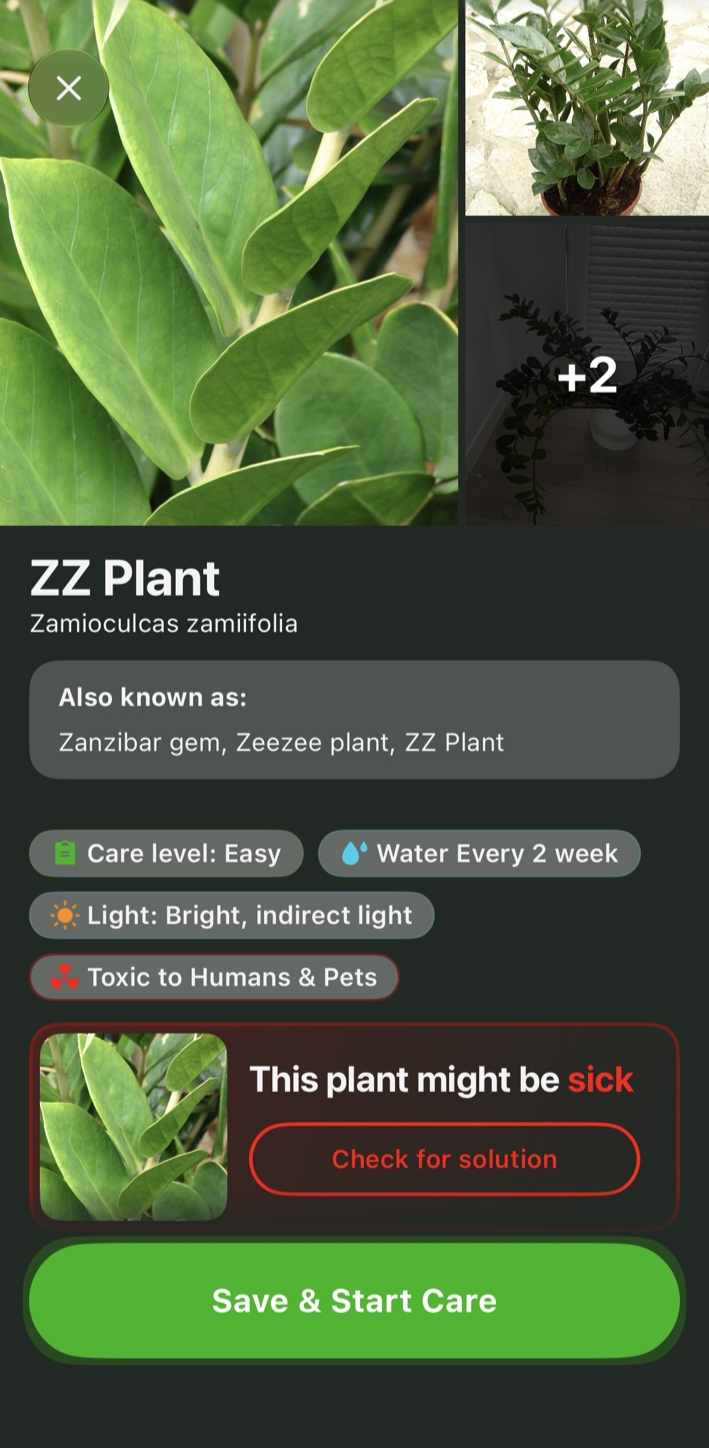
When I used Botan to identify plants by photo, it labeled my test plant as a ZZ plant (Zamioculcas zamiifolia). The result showed alternative names, care level, watering frequency, light needs, and toxicity. That was enough to decide what to check next without leaving the app.
Botan supports flower identification from a photo, which is useful when the bloom is the plant's most distinctive feature. Botanist Chat later suggested a different species from the same image, so I would treat the identification as a starting point, not a final answer.
Diagnosing Plant Diseases and Problems
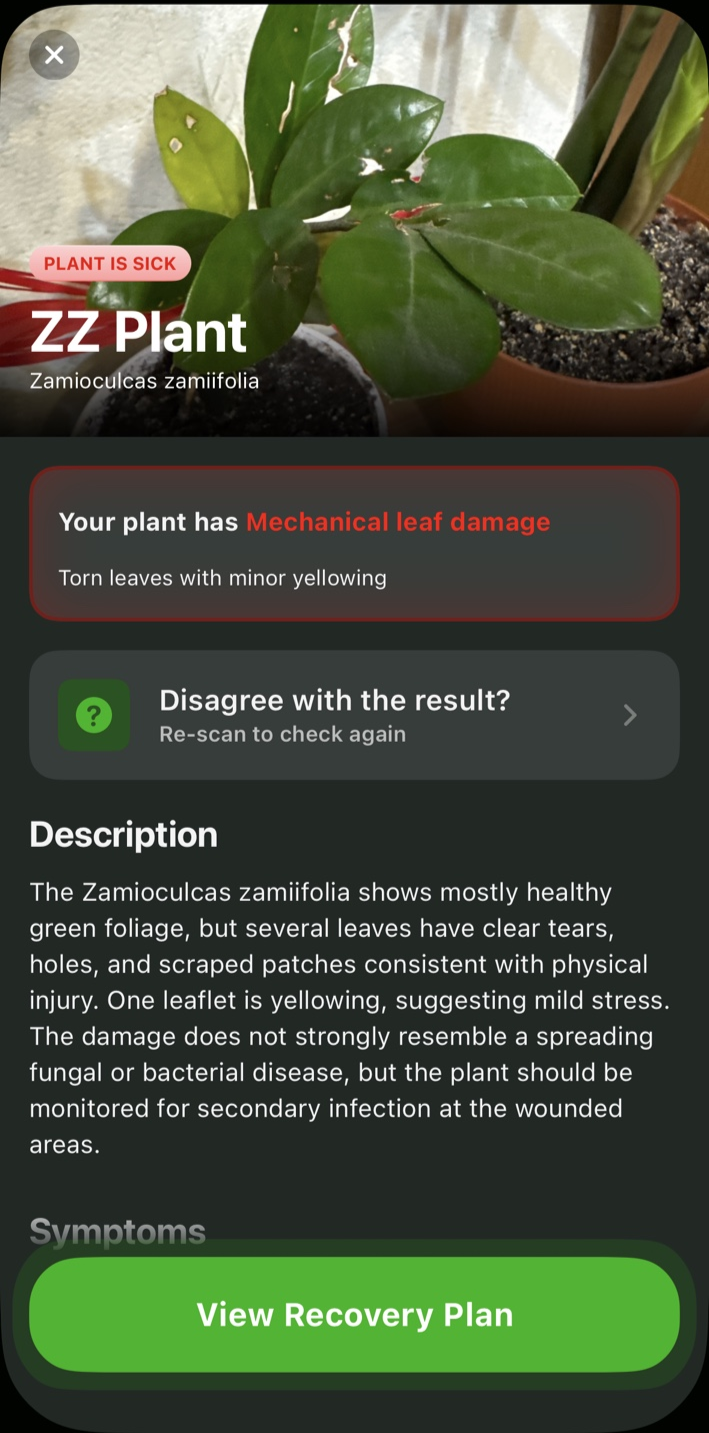
During the health check, Botan labeled the issue as mechanical leaf damage and highlighted torn leaves, irregular holes, scarring, and one yellowing leaflet. It then explained likely causes and built a recovery plan with immediate steps, recurring tasks, and prevention tips. The plan covered pruning, relocation, root checks, watering, cleaning, stem support, and fertilizing.
Symptoms and possible causes appeared in separate sections, so I could see how the app arrived at its suggestion. I would still treat the automated health check as supporting information, not a professional diagnosis.
Plant Care Recommendations
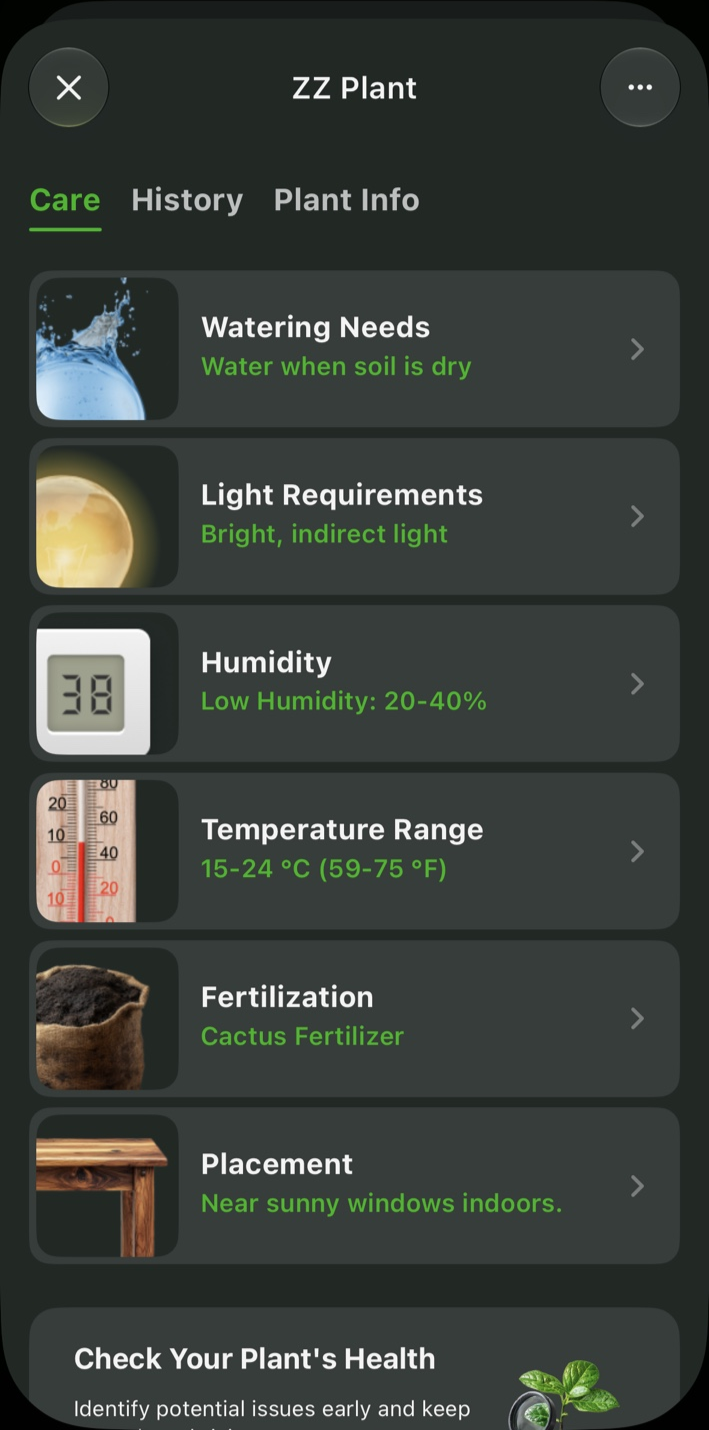
Once Botan identifies a plant, the Care tab shows advice for that match. For my scan, it covered watering, light, humidity, temperature, soil type, soil pH, fertilizing, placement, and reminders. The health check added recovery tasks for pruning, cleaning, root inspection, and stem support.
I could change reminder timing and frequency and see tasks by date, which made it easier to come back to the advice instead of treating the result as something I would read once and forget.
Light Meter
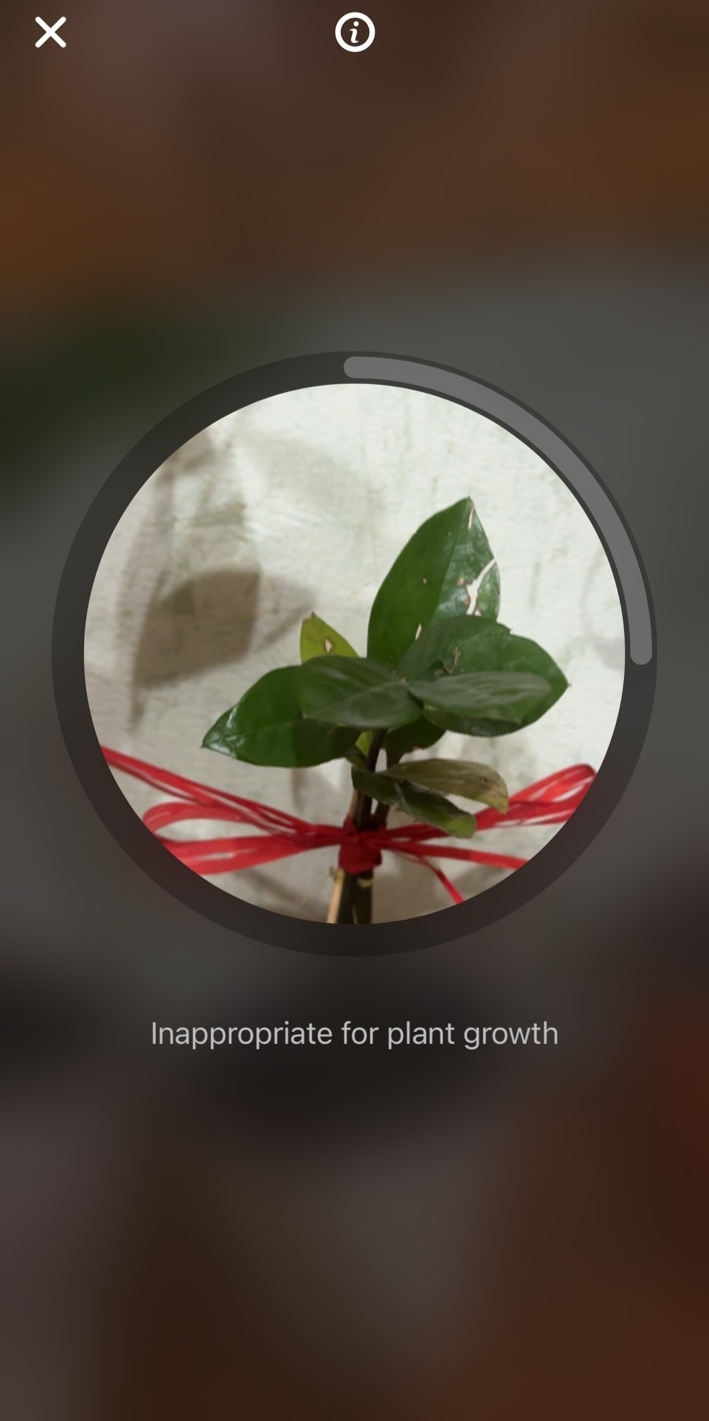
The Light Meter was simple to use. Botan asks users to turn off artificial lights, stand beside the plant, and point the camera toward the sun before taking a reading. In my test, the result was simply “Inappropriate for plant growth.” No lux value, numerical range, or detailed scale appeared, so I treated it as a quick yes-or-no check for the location rather than a technical light meter.
Botanist Chat
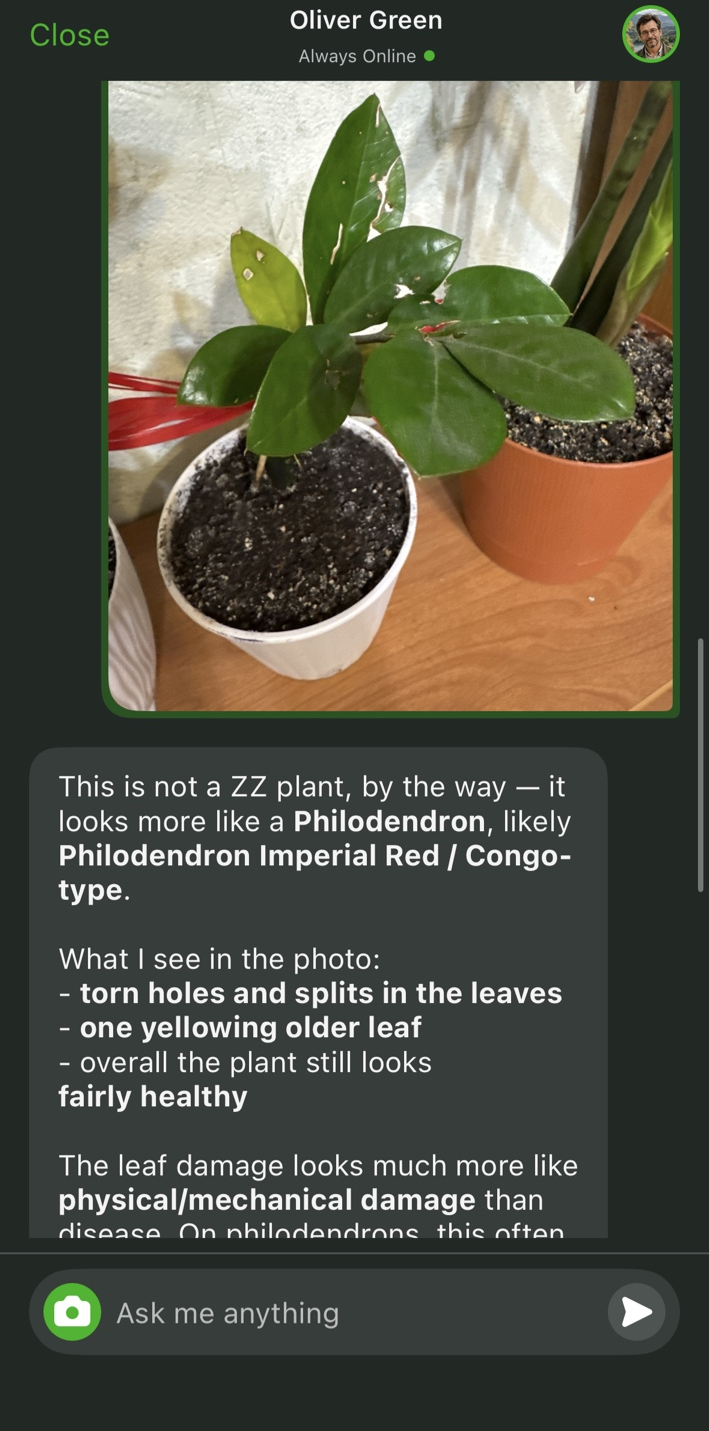
Botanist Chat lets users type questions, choose prompts, or attach a photo. I asked about yellowing leaves; the chat followed up on watering, drainage, light, damage, and growing conditions before giving care advice.
That extra context helped with questions the standard plant card did not address directly. After I uploaded the photo, however, the chat called it a philodendron, while the scanner had matched it to a ZZ plant.
How to Identify a Plant With Botan in 4 Steps
Using Botan as an app to identify plants takes only a few steps. The controls made sense as soon as I opened Identify.
- Tap Identify on the Home screen and choose whether to take a photo or upload one from your phone.
- Keep the plant clearly inside the frame and capture a focused image.
- Wait while Botan checks the species, plant name, toxicity, and visible health information.
- Review the result, then open Care or Plant Info for watering, light, reminders, and other guidance.
The result can also be saved to My Plants for ongoing care. If the match seems uncertain, retake the photo from a clearer angle before saving it.
How Accurate Is Botan at Identifying Plants?
My scan returned a specific result quickly: Zamioculcas zamiifolia, along with care information. The inconsistency stood out when Botanist Chat later said the photo looked more like a philodendron. Because I tested only one plant, I cannot say whether Botan handles common houseplants more reliably than harder-to-identify species.
Image quality can affect the result too. A clear photo with several visible leaves and distinctive features gives the app more to work with. Partial views, poor framing, or missing details may make the match less reliable, especially when different species look similar.
Getting Started With Botan: First Impressions
The main tools were easy to spot when I opened Botan. The Home screen puts Identify and Diagnose at the top, while Chat, My Plants, and the camera button stay visible in the bottom navigation. Account creation and login are in Settings, and I did not have to dig through menus to understand the basic layout.
For my first scan, I opened Identify, framed the plant, and took a photo. The camera told me when the plant was not aligned. The result appeared in a clear card with the plant name, care level, watering, light, and toxicity information. I did not need a tutorial to get through the process.
Botan User Experience: Ease of Use and Results
I did not need much time to figure Botan out. Navigation was clear, and the identification result appeared within a minute in my test. The result card kept the plant name, toxicity, light, and watering information in one place, while Save & Start Care led to reminders and recovery tasks. I could move from the scan to practical next steps without hunting through menus.
Some features depend on image quality and an active internet connection, which may affect the experience in less ideal conditions. Full access to Botan’s features also depends on the selected subscription option.
Botan: Pros and Cons
What worked best for me was how identification led straight into care guidance, reminders, and health tools. The trade-off is that some outputs still need a second look, especially when separate features do not agree.
Pros
| Cons
|
Result card combines species, care basics, and toxicity details
| Full access to identification and care features requires a subscription
|
Care plans include reminders, recovery tasks, and practical follow-up steps
| New scans and analysis require an internet connection
|
Botanist Chat accepts photos and follow-up questions
| Blurry, dark, or incomplete photos can reduce identification accuracy
|
Final Thoughts
After trying Botan's main tools, I came away seeing it as more than a plant scanner. It can suggest a species, build care and recovery plans, set reminders, check light conditions, and answer follow-up questions in Botanist Chat. I would still double-check species matches, since the scanner and chat disagreed on my test image.
Botan is free to download on iOS but includes in-app purchases, while Premium access appears in Settings; exact prices vary by storefront. It should suit beginners and hobby gardeners who want practical guidance and are willing to double-check automated results before acting on them.
FAQ
How accurate is the Botan plant identifier?
Botan can provide specific species suggestions from photos, but accuracy depends on image quality, visible plant features, and how distinctive the species is. My test produced conflicting suggestions across two Botan tools, so I would treat any match as a lead to verify, not a definitive identification.
Is the Botan app free to use?
Botan is free to download, but it is not entirely free to use: the iOS listing includes in-app purchases, while Google Play lists both ads and in-app purchases. Premium access also appears in the app's Settings, so users should check current storefront pricing and trial terms before subscribing.
Can Botan identify plant diseases?
Botan can analyze visible plant health problems and suggest a likely issue, possible causes, symptoms, and recovery steps. For the plant I checked, it identified mechanical leaf damage and built a care plan, but that kind of automated result is not a substitute for expert assessment.
Can Botan tell me how to care for my plant?
Yes, once Botan identifies a plant, it shows care information for watering, light, humidity, temperature, soil, fertilizing, placement, and reminders. It can also create recovery tasks after a health check, turning the result into a practical care routine that users can revisit over time.